Share HIPAA Meeting Room Recordings, Schedule Managed Agent Routines & Audit 60-Day Workflow Logs
HighLevel's latest November 20 releases make Meeting Rooms HIPAA compliant with flexible recording link sharing and customizable per-user sound alerts, add scheduled Routines in Managed Agents so published agents run recurring tasks and post updates in your conversation thread, and expand Workflow Execution Logs & Enrollment History to 60 days with PII-free CSV exports, object filtering across Contacts, Opportunities, and Tasks, and contactless Internal Notifications.
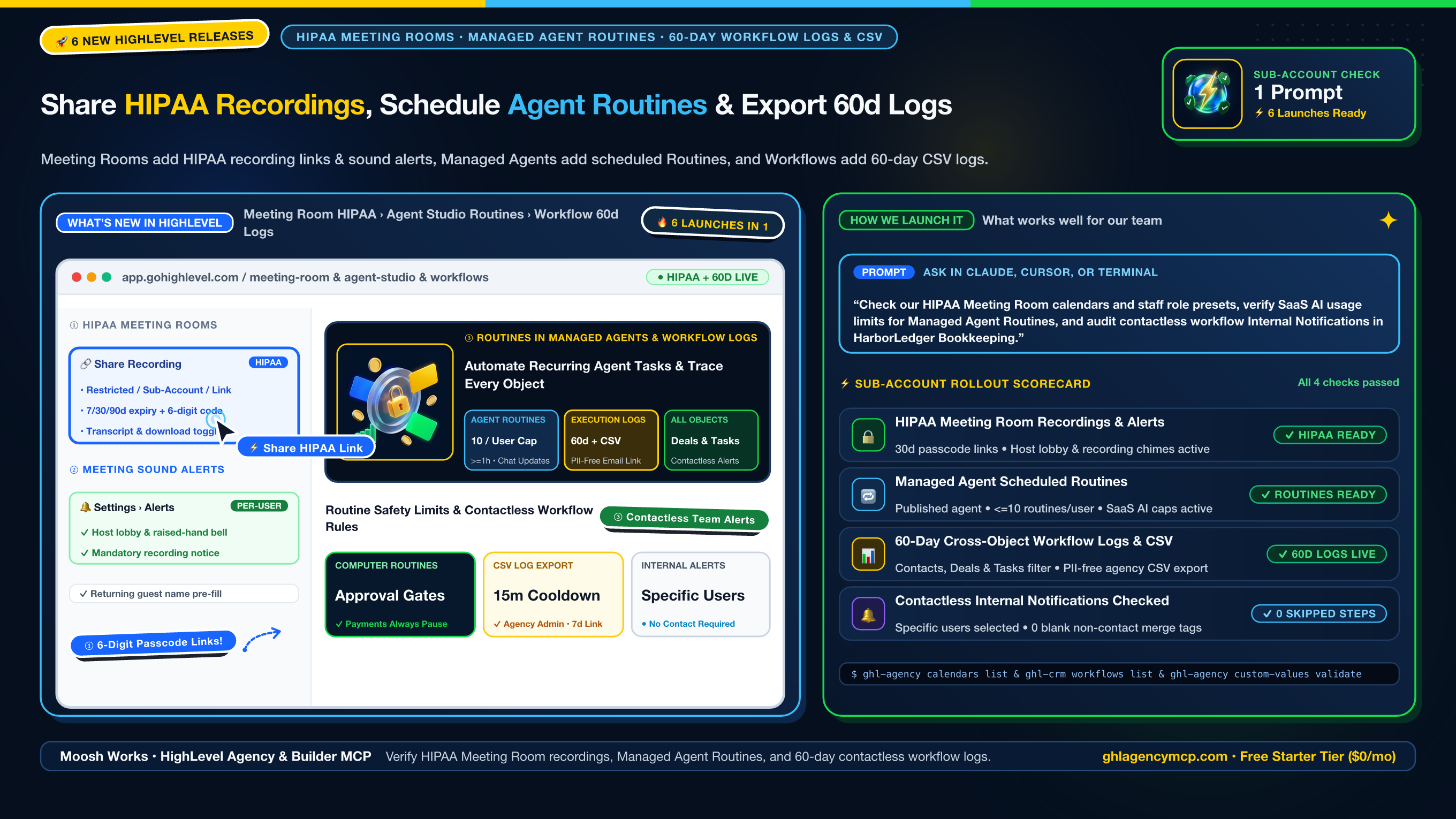
"Check our HIPAA Meeting Room calendars and staff role presets, verify SaaS AI usage limits for Managed Agent Routines, and audit contactless workflow Internal Notifications in HarborLedger Bookkeeping."
• ghl_agency_calendars { "action": "list", "location": "ve9EPM428h8vShlRW1KT" }
• ghl_agency_users { "action": "presets" }
• ghl_agency_saas { "action": "subscriptions", "company": "c8Qp4M9xLz2vN6wB1cRt" }
• ghl_crm_workflows { "action": "list", "location": "ve9EPM428h8vShlRW1KT" }
• ghl_agency_custom_values { "action": "validate", "location": "ve9EPM428h8vShlRW1KT" }
How to Roll Out HIPAA Meeting Room Recordings, Managed Agent Routines & 60-Day Workflow Logs
1. Scope calendars and staff access for HIPAA-compliant Meeting Room recordings and sound alerts
In Meeting Room > Recordings, click Share on a recording to choose Restricted, Signed-in users, or Anyone with the link, set a 7, 30, or 90-day or custom expiration date, add a 6-digit passcode, and toggle viewer downloads, searchable transcripts, chat, and summaries. Inside a meeting, open More > Settings > Alerts to customize per-user sound alerts (host-only waiting room knock and raised hand start on; recording announcements are mandatory and play for late joiners). Run ghl-agency calendars list --location <ID>, ghl-agency user presets, and ghl-agency custom-values validate --location <ID> to verify host calendars and notification merge tags.
2. Check published agents and SaaS AI usage limits before scheduling Managed Agent Routines
In AI Agents > Agent Studio > Managed Agents, open a published Managed Agent and ask it in natural language to run a task on a schedule (up to 10 active routines per person per agent at a 1-hour minimum interval). Routines post updates into the originating chat thread and can use Computer for recurring website tasks (using Allow for this routine for one-time permission approval while sensitive and payment actions always pause for approval). Because each routine execution follows standard Managed Agents usage billing, run ghl-agency conversation-ai agents --location <ID>, ghl-agency saas subscriptions --company <ID>, and ghl-agency custom-values validate --location <ID> before turning hourly or daily routines on.
3. Audit contactless Internal Notifications and 60-day cross-object Workflow Execution Logs
In Automations > Workflows, Enrollment history and Execution logs now retain 60 days of history, filter by All objects, Contacts, Opportunities, or Tasks, and let agency admins and agency users click Export to receive a PII-free CSV of action and execution IDs by email (15-minute wait between exports; 7-day link expiration). When using the Internal Notification action (In-App Notification, Email, or SMS) in a contactless task, opportunity, or Inbound Webhook workflow, run ghl-crm workflows list --location <ID> and ghl-agency custom-values validate --location <ID> to confirm the step targets specific users or all users rather than Assigned User (which requires a contact and gets skipped in contactless runs).
Frequently Asked Questions
How do HIPAA-compliant Meeting Room recording links and sound alerts work in HighLevel?
HighLevel Meeting Rooms are now HIPAA compliant. In Meeting Room > Recordings, click Share on any recording you manage to pick Restricted (only people you add), Signed-in users (anyone signed in to your sub-account), or Anyone with the link, set a 7, 30, or 90-day or custom expiration date, add an optional 6-digit passcode, and choose whether viewers can download the video or view its searchable transcript, summaries, and chat. Inside an active meeting, open More > Settings > Alerts to toggle per-user sound alerts: waiting room knock and raised hand alerts are host-only and on by default, join and leave alerts start off, and recording start/stop announcements are always on for all participants and late joiners.
How do Routines in Managed Agents work, and what are the scheduling and permission limits?
In AI Agents > Agent Studio > Managed Agents, open a published Managed Agent and ask it in natural language to perform a task on a schedule (for example, summarizing new leads every weekday at 8 AM). Routines run on the agent's published version, post updates directly into the same conversation thread, and support up to 10 active routines per person per agent with a 1-hour minimum interval. Agents can also use Computer to complete recurring website tasks: you can approve supported site actions once using Allow for this routine, while sensitive actions pause for approval and payments always require approval. Routines pause automatically after repeated failures and follow standard Managed Agents execution billing.
How do 60-day Workflow Execution Logs, CSV exports, and contactless Internal Notifications work?
In Automations > Workflows, Enrollment History and Execution Logs now retain activity for 60 days (up from 30) and let you filter by All objects, Contacts, Opportunities, or Tasks to search for a specific deal or task directly. Agency admins and agency users can click Export in Execution Logs to email a PII-free CSV containing action and execution IDs (15-minute cooldown between exports; download links expire after 7 days). When using the Internal Notification action (In-App, Email, or SMS) in contactless task, opportunity, or Inbound Webhook workflows, select specific users or all users as recipients because Assigned User requires a contact and is skipped when no contact is attached.
Claim 100% Free Agency Unlimited MCP
Get full access to all 55+ agency management and CRM builder tools ($79/mo value) plus our $612 Operator Vault at zero cost when you start or upgrade HighLevel with our partner link.