Run Video Analysis in HighLevel Managed Agents with Verified Media & Brand Boards
HighLevel just added built-in Video Analysis to Managed Agents in AI Agents > Agent Studio > Managed Agents. Agents can now watch and analyze both visuals and audio from public YouTube links (including Shorts and live videos) or Media Library files up to 2 GB (MP4, MOV, WebM, AVI, MPEG), summarizing a 24-minute webinar in under a minute on token-based billing. In our experience, checking Media Library files, Brand Board logos, and sub-account AI usage caps first keeps automated video reviews and follow-up actions running smoothly.
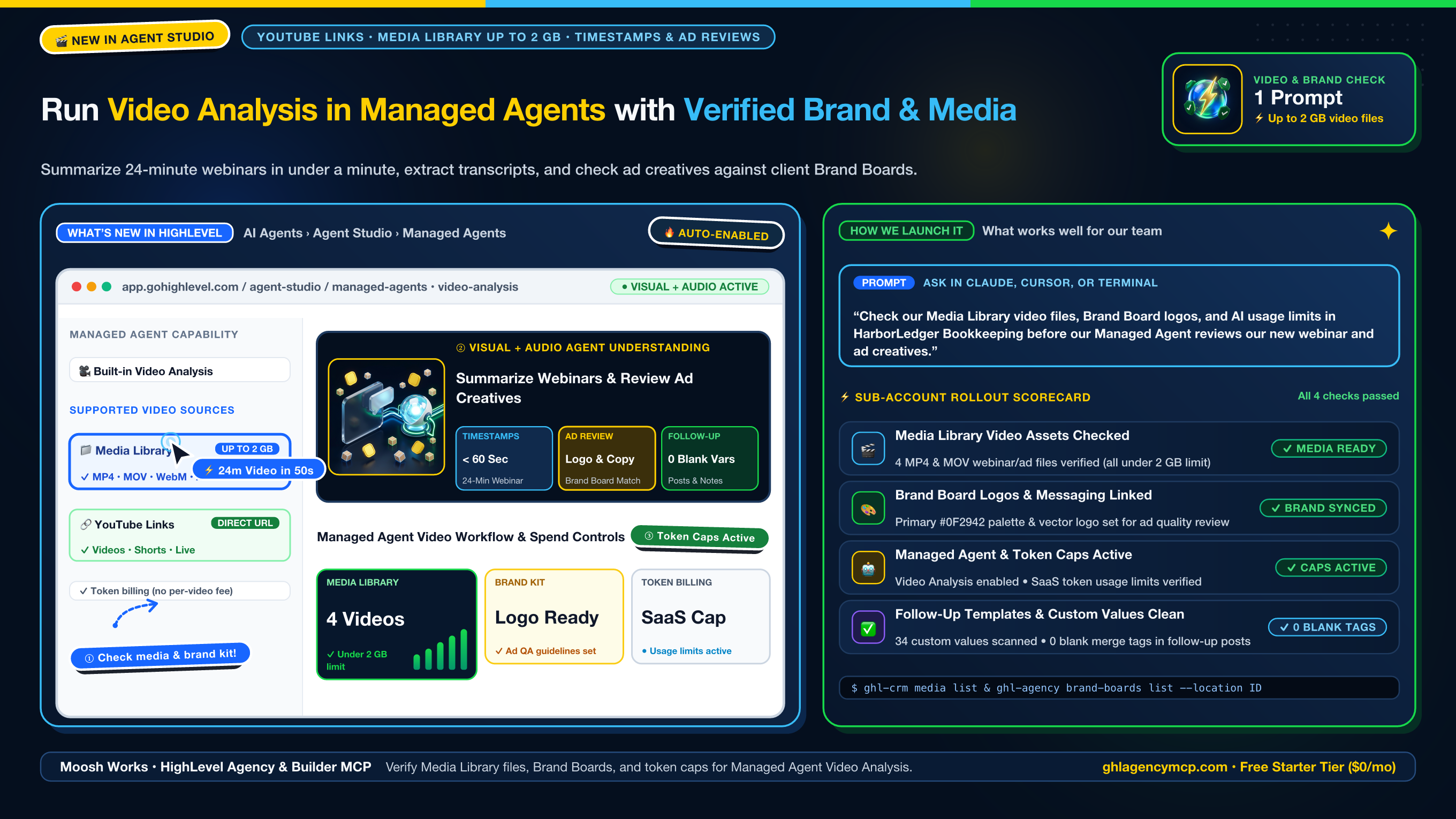
"Check our Media Library video files, Brand Board logos, and AI usage limits in HarborLedger Bookkeeping before our Managed Agent reviews our new webinar and ad creatives."
• ghl_crm_media { "action": "list", "location": "ve9EPM428h8vShlRW1KT" }
• ghl_agency_brand_boards { "action": "list", "location": "ve9EPM428h8vShlRW1KT" }
• ghl_agency_conversation_ai { "action": "agents", "location": "ve9EPM428h8vShlRW1KT" }
• ghl_agency_custom_values { "action": "validate", "location": "ve9EPM428h8vShlRW1KT" }
How to Set Up Managed Agent Video Analysis Across Sub-Accounts
1. Verify Media Library video files or YouTube URLs
In AI Agents > Agent Studio > Managed Agents, open your agent and paste a publicly accessible YouTube link (including Shorts and supported live streams) or attach a video from your HighLevel Media Library. What's worked well for us is checking uploaded files with ghl-crm media list --location <ID> first to confirm recordings use a supported format (MP4, MOV, WebM, AVI, MPEG) under the 2 GB ceiling.
2. Pair ad and video quality checks with Brand Boards
Because Managed Agents understand both visual frames and spoken audio, you can ask an agent to check whether your brand logo or specific offer message appears in an ad creative or generated Multi-Shot Film. We like to run ghl-agency brand-boards list --location <ID> and ghl-agency custom-values validate --location <ID> so the agent checks against the client's real brand assets and sends follow-up posts with zero blank merge tags.
3. Check SaaS AI token usage limits
Video Analysis is enabled automatically for all Managed Agents and bills by standard token usage with no separate per-video fee. Running ghl-agency saas subscriptions --company <ID> lets you confirm sub-account AI usage caps and rebilling rules are active before teams begin analyzing long webinar and training recordings.
Frequently Asked Questions
What video sources and file sizes does Video Analysis in HighLevel Managed Agents support?
Managed Agents in AI Agents > Agent Studio > Managed Agents can analyze publicly accessible YouTube links (including YouTube Shorts and supported live streams) as well as video files uploaded or attached from your HighLevel Media Library in MP4, MOV, WebM, AVI, MPEG, and other popular formats up to 2 GB per file.
Do I need to enable a separate setting or pay a per-video fee for Managed Agent Video Analysis?
No additional toggle or setup is required. Video Analysis is automatically available to all Managed Agents and is billed based on standard token usage with no separate per-video fee.
How can Managed Agents review marketing videos and ad creatives before publishing?
Managed Agents watch both visuals and spoken audio, allowing them to verify whether specific brand logos, visual scenes, or spoken messages appear in an advertisement or generated video. Pairing Video Analysis with ghl_agency_brand_boards lets you check video creatives against the client's official brand kit.
How do I prepare a sub-account for automated video analysis workflows with MCP?
In HighLevel Agency & Builder MCP, run ghl_crm_media to confirm uploaded video files are in a supported format under 2 GB, ghl_agency_brand_boards to pull client logo and messaging tokens, ghl_agency_saas to check sub-account AI usage caps, and ghl_agency_custom_values to verify follow-up templates have zero blank merge tags.
Claim 100% Free Agency Unlimited MCP
Get full access to all 55+ agency management and CRM builder tools ($79/mo value) plus our $612 Operator Vault at zero cost when you start or upgrade HighLevel with our partner link.