Use HighLevel Media Library Photos Inside Managed Agents Without Re-Uploading
In AI Agents > Agent Studio > Managed Agents, agents with Image or Video Generation turned on can now pull existing sub-account photos and stock images from Unsplash and Pixabay directly through + > Choose from Media Library, or look up photos by file name in plain English to build branded reference images and AI video starting frames.
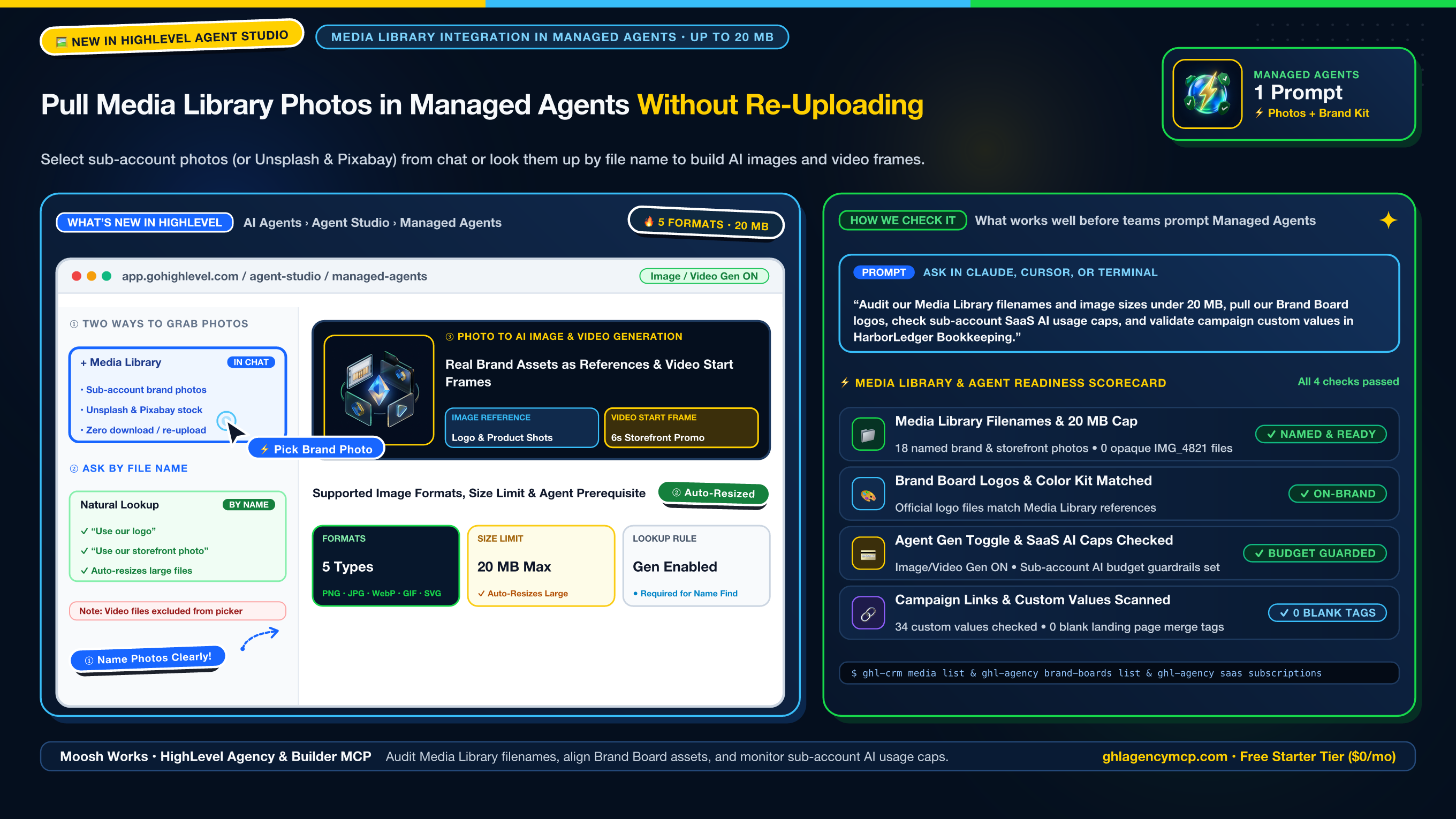
"Audit our Media Library filenames and image sizes under 20 MB, pull our Brand Board logos, check sub-account SaaS AI usage caps, and validate campaign custom values in HarborLedger Bookkeeping for Managed Agents Media Library integration."
• ghl_crm_media { "action": "list", "location": "ve9EPM428h8vShlRW1KT" }
• ghl_agency_brand_boards { "action": "list", "location": "ve9EPM428h8vShlRW1KT" }
• ghl_agency_saas { "action": "subscriptions", "company": "c8Qp4M9xLz2vN6wB1cRt" }
• ghl_agency_custom_values { "action": "validate", "location": "ve9EPM428h8vShlRW1KT" }
How to Prepare a Sub-Account for Managed Agents Media Library Lookup
1. Audit Media Library file names and confirm the 20 MB image cap
In our experience, natural-language image lookup works best when files have plain, descriptive names like storefront-exterior.jpg or primary-logo-dark.png instead of camera defaults like IMG_4821.jpg. Run ghl-crm media list --location <ID> to check sub-account files, confirm assets use supported formats (PNG, JPEG, WebP, GIF, or SVG) under 20 MB, and remember that video files cannot be chosen through the new image picker.
2. Turn on Image or Video Generation and match Brand Board logos
Open AI Agents > Agent Studio > Managed Agents and verify Image or Video Generation is enabled on the agent you want searching the Media Library by name. Run ghl-agency brand-boards list --location <ID> alongside ghl-agency conversation-ai agents --location <ID> so your logos and product photos match the client's official brand kit before generating reference images or 6-second promo videos.
3. Check SaaS AI usage caps and campaign custom values before publishing
We like to review sub-account AI usage caps with ghl-agency saas subscriptions --company <ID> before teams generate multiple image and video variations from client photos, then run ghl-agency custom-values validate --location <ID> so any landing page URLs or booking links paired with the new creatives have zero blank merge tags.
Frequently Asked Questions
How do Managed Agents access photos from the HighLevel Media Library?
In AI Agents > Agent Studio > Managed Agents, open an agent with Image or Video Generation enabled, then click + > Choose from Media Library in the chat to pick sub-account photos or stock images from Unsplash and Pixabay. You can also ask the agent in plain language, such as "Use our logo" or "Create a video using our storefront photo", to find images in your Media Library by name.
What image formats and file size limits apply to Media Library Integration in Managed Agents?
Managed Agents accept PNG, JPEG, WebP, GIF, and SVG images up to 20 MB from the HighLevel Media Library and resize large images automatically when needed. Video files cannot be selected through the new image picker.
Why won't my Managed Agent automatically look up a Media Library photo by name?
Automatic image lookup requires Image or Video Generation to be turned on for that Managed Agent. Lookup also relies on file names, so renaming generic camera files like IMG_4821.jpg to clear names like storefront-exterior.jpg or primary-logo-dark.png helps the agent find the right photo on the first prompt.
Claim 100% Free Agency Unlimited MCP
Get full access to all 55+ agency management and CRM builder tools ($79/mo value) plus our $612 Operator Vault at zero cost when you start or upgrade HighLevel with our partner link.