Choose Which AI Model Builds Each AI Studio Message & Show Exhibitors and Sponsors on Every Event
HighLevel's November 23 updates add an Auto · Beta model picker chip under the chat box in Sub-account > AI Studio (offering Claude Opus 5.5, Claude Sonnet 5.5, GPT-5.6 Sol, GPT-5.6 Terra, Gemini 4 Carbon, Gemini 4 Hydrogen, and default Auto) and bring Exhibitors & Sponsors to every public event page under Events > your event > Content > Exhibitors / Sponsors even when Client Portal is turned off.
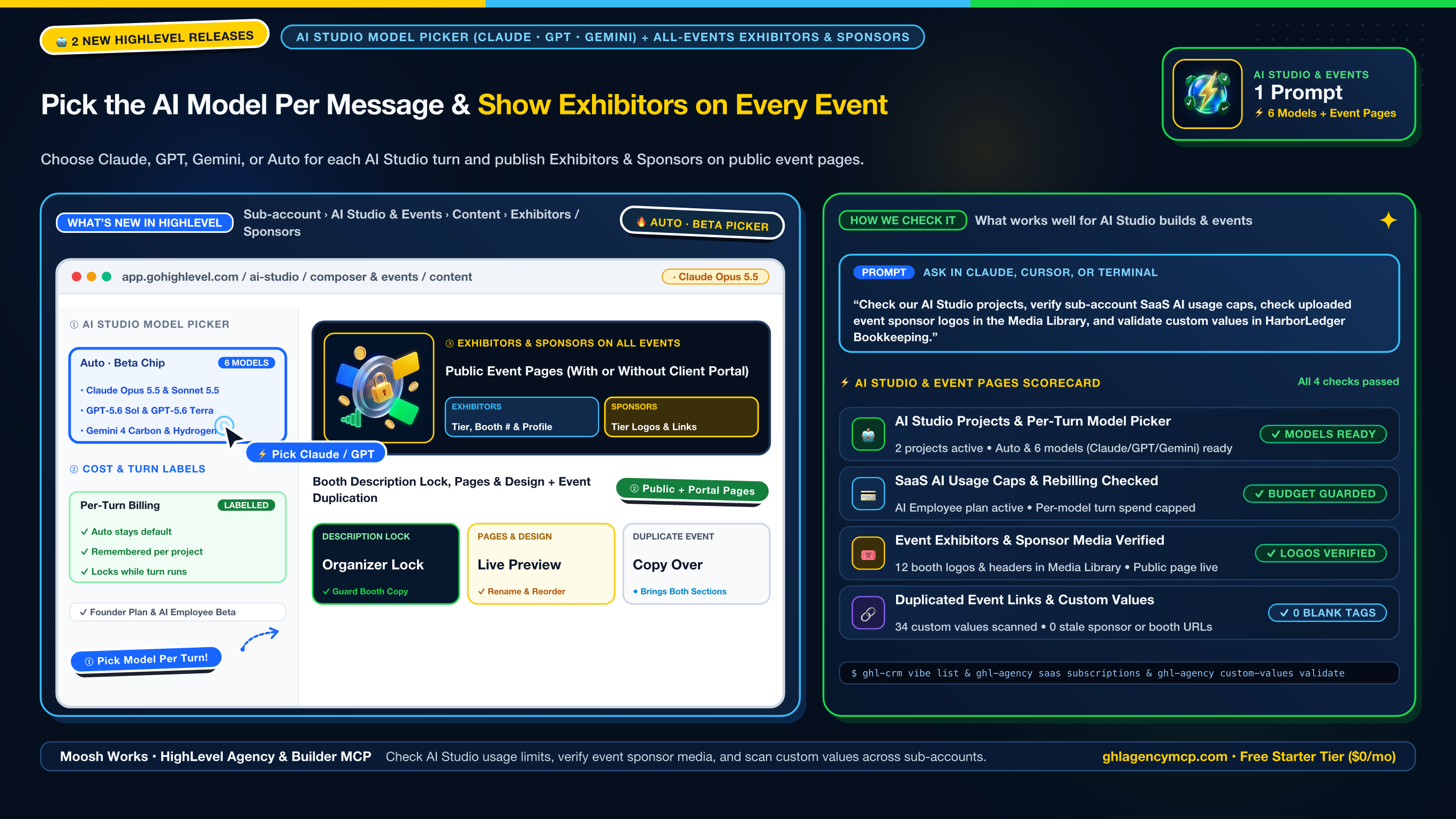
"Check our AI Studio projects, verify sub-account SaaS AI usage caps, check uploaded event sponsor logos in the Media Library, and validate custom values in HarborLedger Bookkeeping."
• ghl_crm_vibe { "action": "list", "location": "ve9EPM428h8vShlRW1KT" }
• ghl_agency_saas { "action": "subscriptions", "company": "c8Qp4M9xLz2vN6wB1cRt" }
• ghl_crm_media { "action": "list", "location": "ve9EPM428h8vShlRW1KT" }
• ghl_agency_custom_values { "action": "validate", "location": "ve9EPM428h8vShlRW1KT" }
How to Roll Out the AI Studio Model Picker and Event Exhibitors & Sponsors
1. Match the AI Studio model to the task and verify SaaS AI usage limits
In Sub-account > AI Studio, click the Auto · Beta chip under the chat box on the dashboard or inside the builder to pick Claude Opus 5.5, Claude Sonnet 5.5, GPT-5.6 Sol, GPT-5.6 Terra, Gemini 4 Carbon, Gemini 4 Hydrogen, or leave it on Auto. Because AI Studio remembers your choice per project and bills each turn at that model's cost, run ghl-agency saas subscriptions --company <ID> and ghl-crm vibe list --location <ID> to keep sub-account AI budgets predictable, and switch back to Auto or a faster model for one-line copy edits.
2. Add Exhibitors and Sponsors and lock approved booth descriptions
In Events > your event > Content > Exhibitors / Sponsors, add exhibitor profiles (company name, tier, booth number, booth note, description, logo, header image, and contact or social links) and reorderable sponsor logo sections (for example, Platinum or Community Partners), then arrange or rename both sections under Pages & design. To keep booth admins from changing approved copy in the Client Portal Exhibitor Center, open the exhibitor's Details tab and untick Allow booth admins to edit the description.
3. Check uploaded logos and custom values after duplicating an event
Both Copy from event and Duplicate now bring Exhibitors and Sponsors into your new event. After duplicating an event, run ghl-crm media list --location <ID>, ghl-agency brand-boards list --location <ID>, and ghl-agency custom-values validate --location <ID> so sponsor logo URLs, booth links, and event variables contain zero stale links or blank {{ custom_values.* }} merge tags.
Frequently Asked Questions
Which AI models can you select per message in HighLevel AI Studio, and how does billing work?
In Sub-account > AI Studio, clicking the Auto · Beta chip under the chat box on the dashboard or inside the builder lets Founder Plan agencies and AI Employee sub-accounts choose between Auto (the default) and six launch models grouped by provider: Claude Opus 5.5, Claude Sonnet 5.5, GPT-5.6 Sol, GPT-5.6 Terra, Gemini 4 Carbon, and Gemini 4 Hydrogen. AI Studio remembers your choice per project, locks the picker while a turn runs, continues answers to AI Studio's questions on the turn's active model, labels every finished turn with the model that ran it (for example, · Claude Opus 5.5), and bills each message at the cost of the model that ran it.
Do HighLevel Events require Client Portal to be turned on to display Exhibitors and Sponsors?
No. Under Events > your event > Content > Exhibitors / Sponsors (arranged in Pages & design), Exhibitors and Sponsors now appear on the public event page for every event whether or not Client Portal is enabled, and also appear in the refreshed Client Portal event detail view when Client Portal is turned on. Both sections carry over automatically when you use Copy from event or Duplicate.
How do event organizers prevent booth admins from changing an approved exhibitor description in the Client Portal?
Open the exhibitor's Details tab under Events > your event > Content > Exhibitors and untick Allow booth admins to edit the description. When unticked, booth admins cannot edit the description from the Client Portal Exhibitor Center, while they can still update their other booth details and organizers can always edit the description from the CRM.
Claim 100% Free Agency Unlimited MCP
Get full access to all 55+ agency management and CRM builder tools ($79/mo value) plus our $612 Operator Vault at zero cost when you start or upgrade HighLevel with our partner link.