What Shipped in HighLevel Affiliate Manager
HighLevel released two Affiliate Manager updates for sub-accounts running partner programs across external checkouts and client portals:
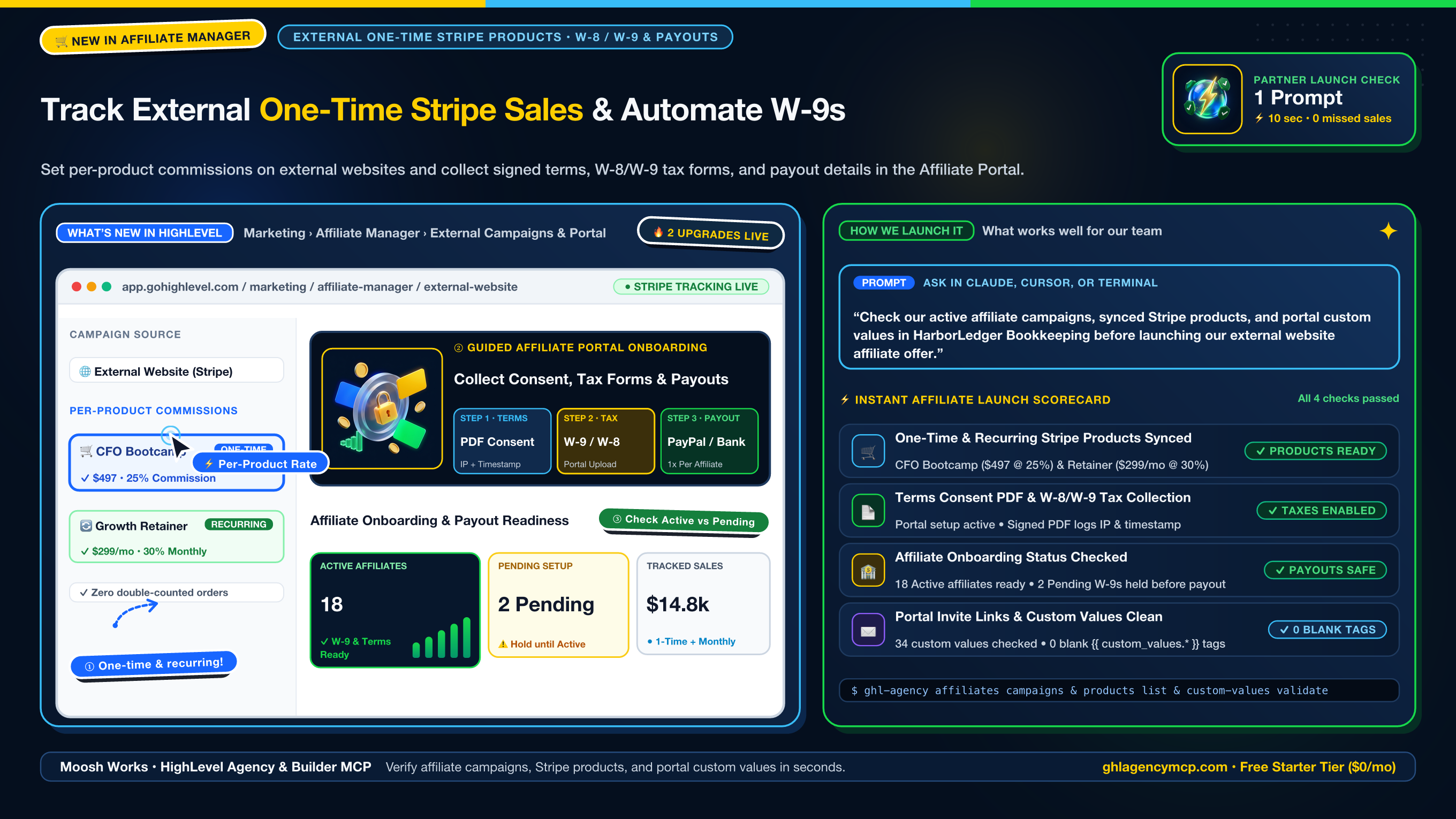
- One-Time Product Support for External Website Campaigns: Previously, External Website affiliate campaigns only tracked recurring Stripe products. You can now select both one-time Stripe products (such as bootcamps, event tickets, setup fees, or digital courses) and recurring subscriptions, assign custom commission percentages or flat amounts per product, and prevent double-counting when one-time and recurring items appear on the same checkout.
- Affiliate Consent, Tax Form & Payout Setup in the Affiliate Portal: Under Marketing > Affiliate Manager > Settings > Affiliate Portal Settings, you can require affiliates to sign your commission terms PDF (logged with timestamp and IP address), upload a
W-8 or W-9 tax form, and add their PayPal or bank payout details once inside the Affiliate Portal. Completion applies across every campaign in that sub-account and marks each partner as Active or Pending.
In our experience, checking synced Stripe products, campaign commission tiers, and affiliate onboarding status before launching a partner promotion keeps commission tracking accurate and prevents paying commissions before a partner's W-9 or W-8 is on file.
Step-by-Step Setup & Sub-Account Verification
Step 1: Verify Synced One-Time and Recurring Stripe Products
In your terminal or MCP client, list the sub-account's product catalog and payment integrations to confirm that your one-time and recurring Stripe products are synced:
ghl-agency products list --location ve9EPM428h8vShlRW1KT --json
ghl-agency payments integrations --location ve9EPM428h8vShlRW1KT --json
✓ Products verified: "CFO Bootcamp" ($497 one-time) + "Growth Retainer" ($299/mo recurring)
✓ Stripe live integration active
In HighLevel, open Marketing > Affiliate Manager > Campaign, click + Add (or edit an existing campaign), and set the source to External Website. Under Set Commission > Advanced Commission Settings, turn on Customise Commission Per Product to set individual rates for each one-time and recurring Stripe product.
Step 2: Enable Affiliate Portal Consent, Tax Forms, and Payout Setup
In HighLevel, open Marketing > Affiliate Manager > Settings > Affiliate Portal Settings:
- Upload or edit your commission terms PDF and enable consent collection (HighLevel records the signature timestamp and IP address).
- Select whether affiliates must upload a W-8, W-9, or both tax forms.
- Enable payout method collection so affiliates enter their PayPal or bank account details directly in the portal.
Step 3: Audit Affiliate Campaigns, Onboarding Status, and Portal Merge Tags
Because a Pending onboarding status is informational and does not block payouts automatically, check your active campaigns, affiliate onboarding statuses, and portal custom values before running payouts:
ghl-agency affiliates campaigns --location ve9EPM428h8vShlRW1KT --json
ghl-agency affiliates list --location ve9EPM428h8vShlRW1KT --json
ghl-agency custom-values validate --location ve9EPM428h8vShlRW1KT --json
✓ 2 active affiliate campaigns verified (External Website one-time + recurring products mapped)
✓ 18 Active affiliates ready for payout; 2 Pending affiliates flagged (awaiting W-9 upload)
✓ Scanned 34 custom values: 0 blank {{ custom_values.* }} merge tags
One-Prompt MCP Recipe (Claude, ChatGPT, Cursor & Antigravity)
With https://ghlagencymcp.com/mcp connected, you can verify your entire Affiliate Manager setup in a single prompt:
"Check our active affiliate campaigns, synced Stripe products, and portal custom values in HarborLedger Bookkeeping before launching our external website affiliate offer."
• ghl_agency_affiliates { "action": "campaigns", "location": "ve9EPM428h8vShlRW1KT" }
• ghl_agency_products { "action": "list", "location": "ve9EPM428h8vShlRW1KT" }
• ghl_agency_custom_values { "action": "validate", "location": "ve9EPM428h8vShlRW1KT" }
Frequently Asked Questions
Can HighLevel External Website affiliate campaigns track one-time Stripe products as well as subscriptions?
Yes. When you select External Website as the campaign source in Marketing > Affiliate Manager > Campaign, HighLevel now tracks both one-time Stripe products and recurring subscriptions without double-counting orders. You can also set custom commission rates per product under Set Commission > Advanced Commission Settings > Customise Commission Per Product.
How do affiliates submit W-8 or W-9 tax forms and payout details in HighLevel?
In Marketing > Affiliate Manager > Settings > Affiliate Portal Settings, enable commission terms consent, tax form upload (W-8, W-9, or both), and payout method setup (PayPal or bank account). Affiliates complete this 3-step onboarding flow once inside the Affiliate Portal, and their completion status applies across all campaigns in that sub-account.
Does a Pending affiliate onboarding status block commission payouts automatically?
No. Affiliate onboarding status (Active vs Pending) is informational and does not block payouts automatically. Before approving commission payouts, inspect the Affiliates list or run ghl-agency affiliates list to confirm the partner has an Active status with a signed terms PDF and uploaded W-8 or W-9 tax form.