Request Google Ads Policy Exemptions & Retry Publishing in HighLevel Ad Manager
HighLevel Ad Manager (Marketing > Ad Manager) now lets you request policy exemptions for eligible Google Ads policy violations directly inside the campaign builder. When Google flags an eligible violation during publishing, click Request Exemption, review the policy details, check the confirmation box, and click Request and Publish to submit the exemption and retry publishing automatically. Since exemption requests only resolve eligible policy flags and will not fix broken landing page URLs or unverified domains, we like to check destination funnels, custom domains, and call-tracking pools first.
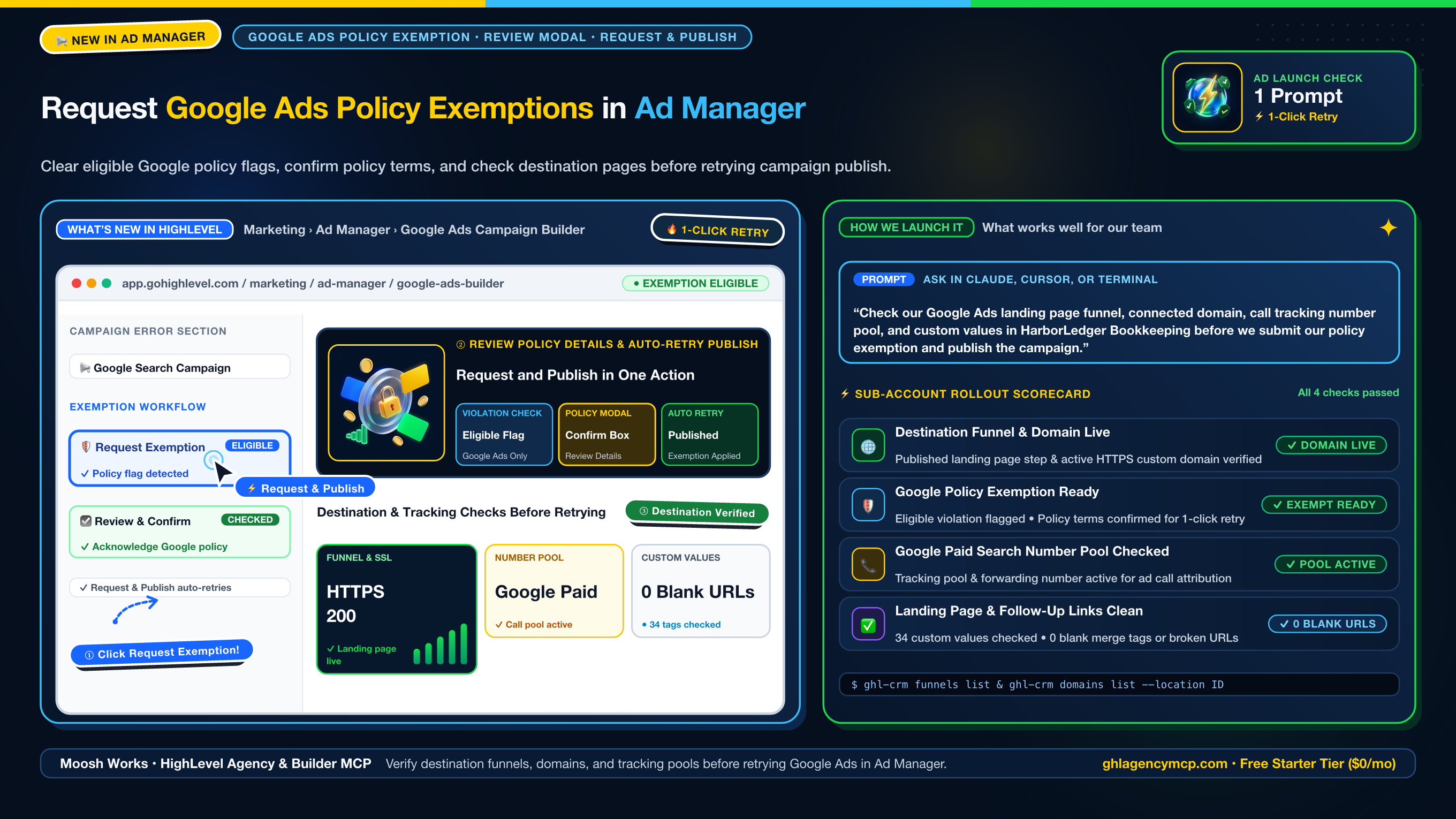
"Check our Google Ads landing page funnel, connected domain, call tracking number pool, and custom values in HarborLedger Bookkeeping before we submit our policy exemption and publish the campaign."
• ghl_crm_funnels { "action": "list", "location": "ve9EPM428h8vShlRW1KT" }
• ghl_crm_domains { "action": "list", "location": "ve9EPM428h8vShlRW1KT" }
• ghl_agency_phone { "action": "pools", "location": "ve9EPM428h8vShlRW1KT" }
• ghl_agency_custom_values { "action": "validate", "location": "ve9EPM428h8vShlRW1KT" }
How to Resolve Eligible Google Ads Policy Flags & Verify Destination Pages
1. Verify the destination funnel step and custom domain
Run ghl-crm funnels list --location <ID> and ghl-crm domains list --location <ID> before launching or retrying your Google Ads campaign. Confirming that the destination page step is published on an active HTTPS domain prevents Google Ads from rejecting the ad for a destination error after you submit a policy exemption.
2. Check call-tracking number pools and custom value URLs
Run ghl-agency phone pools --location <ID> to verify that your Google Paid Search number pool and forwarding number are active, and run ghl-agency custom-values validate --location <ID> to catch any blank {{ custom_values.* }} links or TBD placeholders on the landing page.
3. Submit Request Exemption and click Request and Publish in Ad Manager
In Marketing > Ad Manager, open your Google Ads campaign and locate the eligible policy error in the campaign error section. Click Request Exemption, review the policy violation details in the modal, check the confirmation box acknowledging Google's advertising policies, and click Request and Publish to submit the exemption and retry publishing.
Frequently Asked Questions
How do Google Ads policy exemption requests work in HighLevel Ad Manager?
When Google flags a policy violation during campaign publishing in Marketing > Ad Manager, HighLevel identifies whether the violation qualifies for an exemption and shows a Request Exemption button in the campaign's error section. Clicking Request Exemption opens a modal with the policy violation details and a confirmation checkbox. After checking the acknowledgment box, click Request and Publish to submit the exemption request and automatically retry publishing the campaign.
Does Request Exemption fix all Google Ads campaign publishing errors?
No. The Request Exemption option appears only for eligible Google Ads policy violations. It does not resolve unrelated validation or publishing errors such as an unpublished destination funnel step, an unverified custom domain, missing call-tracking number pools, or blank merge tag URLs.
Which ad platforms support in-app policy exemption requests in HighLevel Ad Manager?
This feature is available for Google Ads campaigns inside HighLevel Ad Manager when Google marks the specific policy violation as eligible for an exemption. Campaign publishing remains subject to Google's advertising policies and standard review process.
How do I check a client sub-account before clicking Request and Publish with MCP?
In HighLevel Agency & Builder MCP, run ghl_crm_funnels and ghl_crm_domains to confirm the destination landing page is published on an active HTTPS domain, ghl_agency_phone (action: "pools") to verify the Google Paid Search call-tracking number pool, and ghl_agency_custom_values (action: "validate") to catch any blank URL merge tags before retrying campaign publication.
Claim 100% Free Agency Unlimited MCP
Get full access to all 55+ agency management and CRM builder tools ($79/mo value) plus our $612 Operator Vault at zero cost when you start or upgrade HighLevel with our partner link.